For iPhone & iPad · Android coming soon

One app for every conversation.

Live captions and translation for the world around you — lectures, two-way conversations, recordings, even signs and menus. No meeting link, nothing to set up, and your words stay private. 60+ languages, including regional dialects.

ES → EN → KO → JAComing soon to the App Store & Google PlayYour audio is never stored
On-device · low latency
60+ languages
Private by design
60+ languagesAudio processed transiently, never storedTranscripts stay on your deviceBuilt native for iPhone & iPad
The problem

Wherever language gets in the way, QolSync helps you understand.

A lecture you can't follow. A conversation you can't join. A recording you can't read. QolSync AI turns the speech around you into words you understand — as it happens.

Who it's for

What will you use it for?

Three moments where QolSync AI earns its place on your home screen.

For travelers

Travel conversations

Hold real two-way conversations with locals — one phone between you, each side reading and hearing their own language.

For students

Lectures & classes

Follow a class taught in another language with live captions on your device — and keep a transcript to review later.

For professionals

Meetings & recordings

Sit in any meeting or multilingual discussion and read along live, or import a recording and get a clean, speaker-labeled transcript.

One app, every situation

Built for the moment you're in

Whatever's in front of you — a lecture, a chat, a menu, a recorded file — there's a tool built for it. Switch in a tap.

강의 Lecture · 대화 Talk · 받아쓰기 Transcribe

Translate Around Me

Point your phone at whoever's speaking. Live captions and translation appear as they talk — perfect for lectures, seminars, and conversations on the go. Or just transcribe in your own language.

ESHola, ¿cómo estás?
ENHi, how are you?
ESMuy bien, gracias.
ENVery well, thanks.

Two-Way Conversation

You and someone who speaks another language, one phone between you. Each of you hears the other in your own tongue — in real time.

Capture & Translate

Aim the camera at a menu, a sign, or a document. The translation overlays right on what you're looking at.

Documents & Web

Drop in a PDF, a Word file, a website link, or pasted text — and read the whole thing back in your language.

Audio & Files

Share a voice memo or upload a recording. Get a clean, searchable bilingual transcript back — no typing.

After the session

It doesn't stop when the talking does.

Everything you translate is saved, searchable, and ready to revisit — listen to it, export it, or ask it questions. This is where QolSync AI earns its place on your home screen.

A searchable library

Every session saves automatically. Search any word, add your own tags, and filter by category or tag to find it in seconds.

Listen hands-free

Natural, lifelike text-to-speech reads any translation aloud — catch up on a lecture in the car or review a chat on a walk.

Keep the original audio

Turn on recording during Live Translation to save the source audio next to the translation — replay exactly what was said. Recording even sharpens the live result as it runs.

Export to PDF or Word

Download any transcript or translation as a clean, formatted PDF or Word document — perfect for students reviewing a class.

Summarize & ask

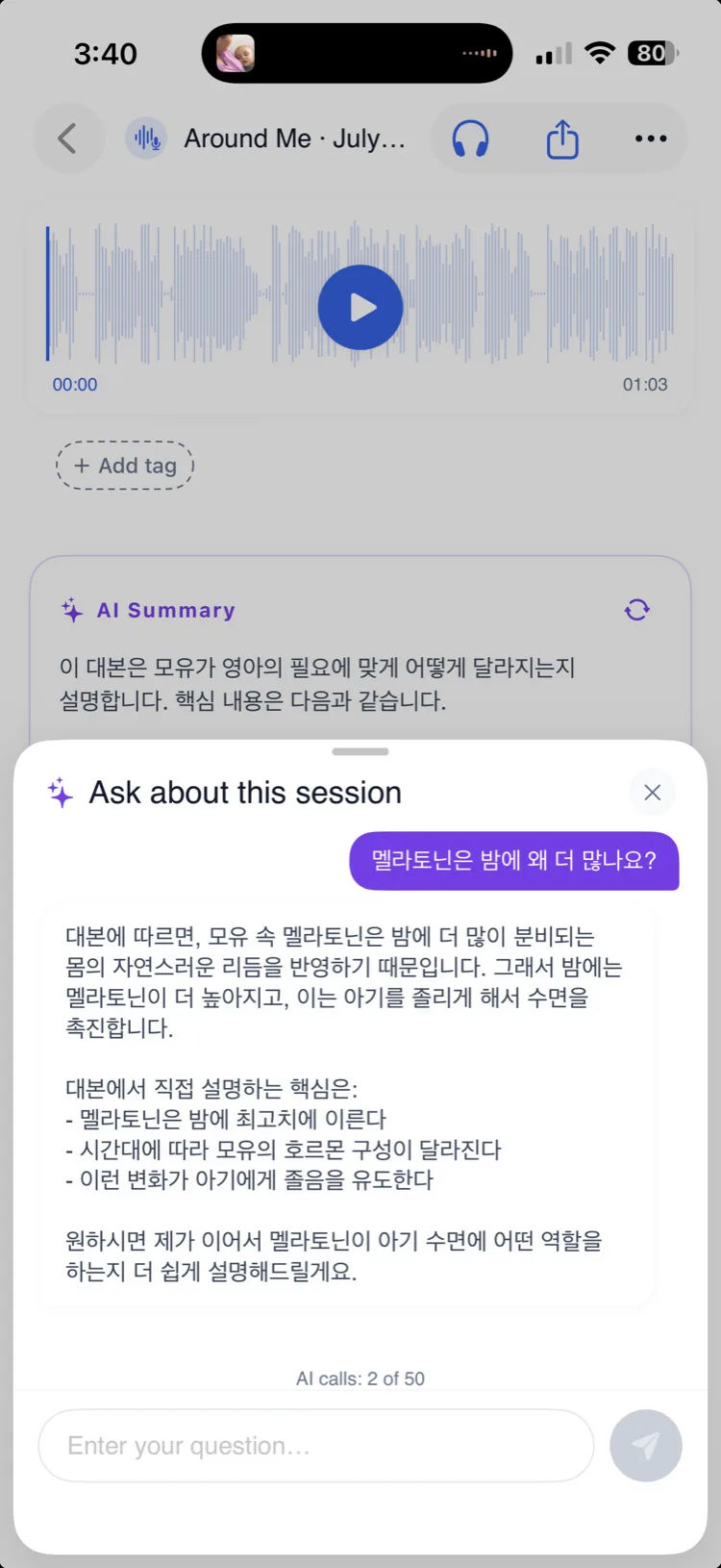
Get an instant summary of any session, or ask questions about what was said — answered in your language.

The world, in one app
60+

languages, with real regional dialects

From Korean to Quechua, Brazilian Portuguese to Egyptian Arabic — including dozens of regional variants, shown in their native script.

Proof, not promises

Real screens from the app

These are genuine QolSync AI screens on iPhone — from picking a mode to live translation, files, and transcripts. No mockups.

  • QolSync AI New Session screen on iPhone, choosing a translation mode
    Pick a modeChoose how you want to translate.
  • Translate Around Me screen with a language selector and speed settings
    Translate Around MeLive translation for lectures and people nearby.
  • Two-Way Conversation setup with Person A and Person B language pickers
    Two-Way ConversationTwo people, two languages, one device.
  • Upload Audio screen with a file picker and quality options
    Audio & filesUpload a recording for a bilingual transcript.
  • Transcribe screen waiting to turn live speech into text
    TranscribeSpeech to text, without translation.
  • Translate screen with Text, Document, and Link tabs
    Text, docs & linksTranslate pasted text, a document, or a link.
Built native, not bolted on

Made for iPhone. Made for iPad.

Not a website in a wrapper — a true native app. It adapts to the big screen with a split Recents view, and lights up your Lock Screen and Dynamic Island while a session runs. Android is coming soon.

iPad split-view Recents

Browse sessions on the left, read the transcript on the right.

Live Activity & Dynamic Island

See your session timer and language pair without opening the app.

QolSync AI on iPad showing the Translate Around Me layout on the big screen
QolSync AI on iPhone showing the New Session mode picker
Private by design

Your words don't stick around.

Translation should feel safe. When you translate live, your speech is transcribed the instant you speak and then it's gone — the heavy AI never keeps a copy, and your transcripts live only on your device.

Your audio isn't stored

Your speech is processed only to transcribe and translate it, in the moment — and isn't kept afterward. Files you choose to upload are handled securely and not retained beyond the job.

Zero-retention AI

Summaries and answers run through providers under zero-data-retention agreements — nothing is kept to train on.

Transcripts stay on your device

Your history is saved locally and searchable offline. We don't keep your transcripts in the cloud.

Launching soon

Be first to speak every language.

QolSync AI is coming to iPhone and iPad, with Android to follow. Leave your email and we'll let you know the moment it's live.

Which platform? (optional)
Coming soon to theApp StoreComing soon toGoogle Play

No spam — one email when we launch, and you can unsubscribe any time.